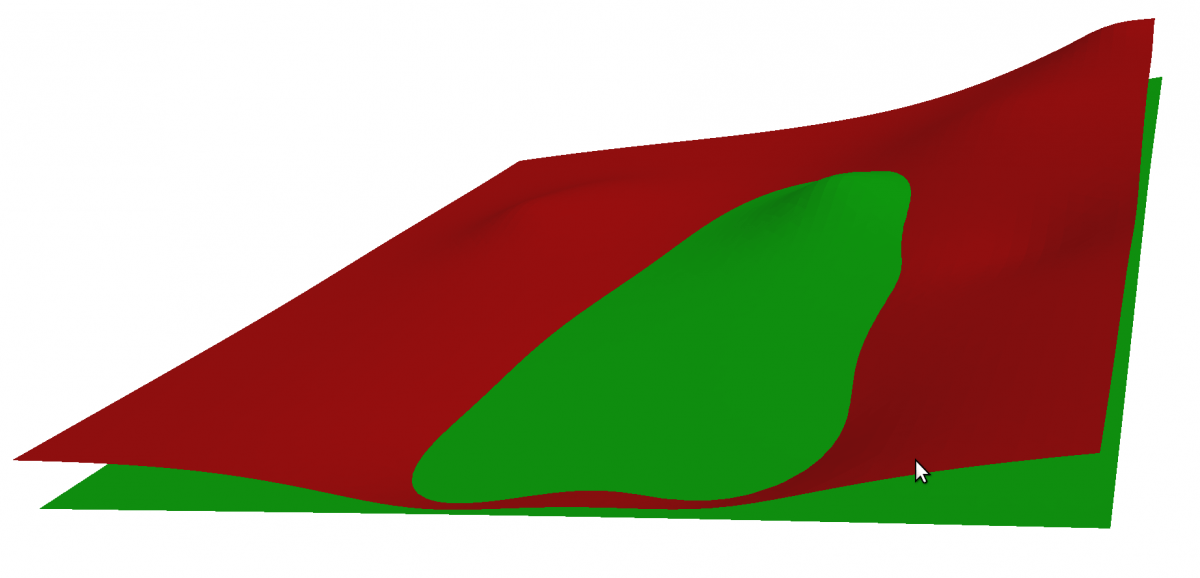
Cut And Fill (Wikipedia) Earthwork volume computations for C++. The library module Cut-And-Fill takes two overlapping surfaces and computes the volume between. The result is a set of volumes where soil must be filled or where material must be digged off to turn one surface into the other one.
Example Source Code – Basic Usage
This example is a bit longer than the others but it’s certainly easy to understand. Let’s look at the first part of the source code.
- Create two random surfaces in separate Delaunay triangulations. They serve as input data in this example. One represents the surface before the earthworks, the other the surface after. Note: The input triangulations do not need to be created from points. You can also import existing triangulations instead.
- Create two global
Zone2objects from the two triangulations. It is allowed that the zones are not exactly coinciding. The algorithm will only use the common area. In the Mesh Improvements article it was already shown how to delete unwanted border triangles usingpeelOffIf()and we use this function here also. - Visualization
- Create a
CutAndFillobject, optionally register your own progress bar class and callCutAndFill::go() - Report the individual components (volumes)
// e: Cut-and-Fill
int cutAndFill_main()
{
	std::cout<<"\n* Fade2.5D Demo - Cut & Fill"<<std::endl;
	std::cout<<"----------------------------"<<std::endl<<std::endl;

	// * 1 *   Create two random surfaces, 2 x ~10 000 triangles.
	std::cout<<"\nPreparing two surfaces...\n\n"<<std::endl;
	vector<Point2> vRndSurfacePoints0;
	vector<Point2> vRndSurfacePoints1;
	generateRandomSurfacePoints(
		70, // numPointsX
		70, // numPointsY
		20, // numCenters
		0,0,-60,1000,1000,60, // Bounds xmin,ymin,zmin,xmax,ymax,zmax
		vRndSurfacePoints0,	// Output vector
		1	// Seed
		);
	generateRandomSurfacePoints(
		70, // numPointsX
		70, // numPointsY
		1, // numCenters
		150,-100,-30,1050,1050,30, // Bounds xmin,ymin,zmin,xmax,ymax,zmax
		vRndSurfacePoints1,	// Output vector
		2	// Seed
		);
	Fade_2D dt0;
	Fade_2D dt1;
	dt0.insert(vRndSurfacePoints0);
	dt1.insert(vRndSurfacePoints1);

	// * 2 *   Create Zones: One zone before the earthworks and one zone
	// after. The two zones do not need to match exactly, the algorithm
	// uses the overlapping area. Although the raw zones could be used
	// it is advised to peel off salient border triangles first whose
	// projection to the XY plane is almost zero. The behavior is
	// controlled by the user-specified PeelPredicate class.
	Zone2* pZoneBeforeRaw(dt0.createZone(NULL,ZL_GLOBAL,false));
	Zone2* pZoneAfterRaw(dt1.createZone(NULL,ZL_GLOBAL,false));
	Decider decider;
	Zone2* pZoneBefore=peelOffIf(pZoneBeforeRaw,true,&decider);
	Zone2* pZoneAfter=peelOffIf(pZoneAfterRaw,true,&decider);


	// * 3 *   Print & Draw
	cout<<"Surface before: "<<pZoneBefore->getNumberOfTriangles()<<" triangles"<<endl;
	cout<<"Surface after: "<<pZoneAfter->getNumberOfTriangles()<<" triangles"<<endl<<endl;
	pZoneBefore->showGeomview("e0_zoneBefore.list","1 0 0 0.5");
	pZoneAfter->showGeomview("e0_zoneAfter.list","0 1 0 0.5");
	dt0.writeObj("e0_zoneBefore.obj",pZoneBefore);
	dt1.writeObj("e0_zoneAfter.obj",pZoneAfter);


	// * 4 *   Create a CutAndFill object, register a progress bar
	//         (optional) and start the computations
	CutAndFill caf(pZoneBefore,pZoneAfter);
	MyCAFProgBar progBar=MyCAFProgBar();
	caf.subscribe(MSG_PROGRESS,&progBar);
	bool bOK=caf.go();
	if(!bOK)
    {
		cout<<"Cut&Fill computation (caf.go) failed: Check if the input surfaces do overlap!"<<endl;
		cout<<"- Can't continue"<<endl;
		return 1;
	}

	// * 5 *   Fetch connected components and report
	cout<<"\nReport:"<<endl;
	cout<<"-------"<<endl;
	cout<<"Number of components: "<<caf.getNumberOfComponents()<<endl;
	for(size_t i=0;i<caf.getNumberOfComponents();++i)
	{
		CAF_Component* pComponent(caf.getComponent(i));
		cout<<*pComponent<<endl;
	}
	...
Report:

——-

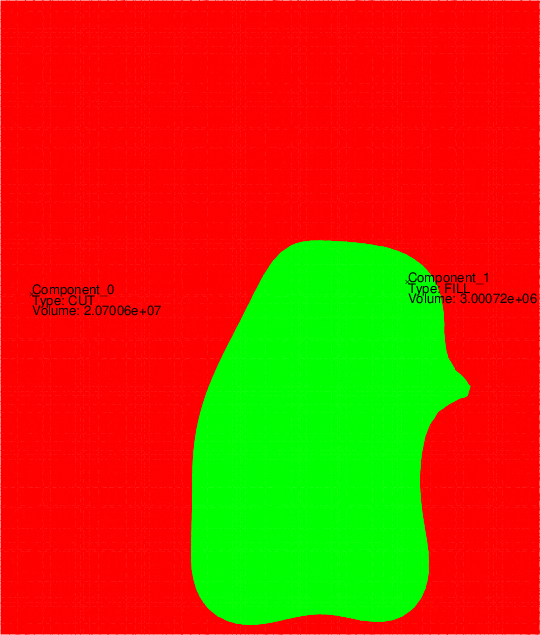
Number of components: 2

Component 0, Type: CUT , Volume: 2.07006e+07

Component 1, Type: FILL, Volume: 3.00072e+06
Example Source Code – Advanced Usage
In order for Cut&Fill to perform its calculations, it must generate a compatible triangulation from the two input triangulations, which is useful for many purposes aside from Cut&Fill. For this reason, the access function getDiffZone() exists to be able to access CutAndFill‘s internal data structures.
pDiffZonecontains a compatible triangulation of the common overlapping part ofpZoneBeforeandpZoneAfter. The z-values of this triangulation correspond just to the height difference.mVtx2BeforeAfteris a map that contains for each vertex ofpDiffZonethe z-values of the two input zones.
	// * 7 *   Access the internal datastructures
	std::map< Point2 *, std::pair< double, double > > mVtx2BeforeAfter;
	Zone2* pDiffZone(NULL);
    bool bOK2=caf.getDiffZone(pDiffZone,mVtx2BeforeAfter);
	if(!bOK2)
    {
		cout<<"caf.getDiffZone() failed: Did not get pDiffZone. Check your input data."<<endl;
		return 1;
	}
To show how to use this data, we now write a face list. The list shall start with all vertices specified with label, x, y, z-difference, z-before, z-after:
Facelist: numPoints=36338, numTriangles: 72049

0   x=159.42 y=115.942  zdiff=48.1178 zBefore=19.1604 zAfter=-28.9574

1   x=159.42 y=130.435  zdiff=47.7614 zBefore=18.8732 zAfter=-28.8882

2   x=159.42 y=144.928  zdiff=47.4169 zBefore=18.5979 zAfter=-28.819

3   x=159.42 y=159.42   zdiff=47.0847 zBefore=18.3346 zAfter=-28.7501

And so on… (list truncated)
After that the triangles follow. It is enough to specify them by vertex indices:
20102 20098 20099

17301 4707 17248

18635 378 18633

15206 15189 170

24382 24375 24377
And below is the code for this list:
- Assign custom indices to the points in pDiffZone
- Open an output file
- Fetch the triangles from pDiffZone
- Write the point list (see above)
- Write the triangle indices list (see also above)
	// * 8 *   Assign custom indices to the points in pDiffZone
	vector<Point2*> vZonePoints;
	pDiffZone->getVertices(vZonePoints);
	int counter(0);
    for(vector<Point2*>::iterator it(vZonePoints.begin());it!=vZonePoints.end();++it)
    {
        Point2* pVtx(*it);
        pVtx->setCustomIndex(counter++);
    }

	// * 9 *   Write a face-list file
	const char* filename("facelist.txt");
	std::ofstream file(filename);
	...

	// * 10 *   Fetch the triangles
    vector<Triangle2*> vTriangles;
    pDiffZone->getTriangles(vTriangles);
	file<<"Facelist: numPoints="<<vZonePoints.size()<<", numTriangles: "<<vTriangles.size()<<endl;

	// * 11 *   Write the point list
	for(vector<Point2*>::iterator it(vZonePoints.begin());it!=vZonePoints.end();++it)
    {
        Point2* pVtx(*it);
        int idx(pVtx->getCustomIndex());
        std::map< Point2 *, std::pair< double, double > >::iterator q_it(mVtx2BeforeAfter.find(pVtx));
        assert(q_it!=mVtx2BeforeAfter.end());
        double zBefore(q_it->second.first);
        double zAfter(q_it->second.second);
		file<<idx<<"\tx="<<pVtx->x()<<" y="<<pVtx->y()<<"\tzdiff="<<pVtx->z()<<" zBefore="<<zBefore<<" zAfter="<<zAfter<<endl;
    }

	// * 12 *   Write the corner indices list
    for(vector<Triangle2*>::iterator it(vTriangles.begin());it!=vTriangles.end();++it)
    {
        Triangle2* pT(*it);
        file<<pT->getCorner(0)->getCustomIndex()<<" ";
        file<<pT->getCorner(1)->getCustomIndex()<<" ";
        file<<pT->getCorner(2)->getCustomIndex()<<"\n";
    }
	file.close();